
Hello World, I’ve been so busy with my work that I didn’t get the time to blog about Proxmox VE software. Even if I do not write a lot about Proxmox VE (PVE), I stillContinue reading
Category: PROXMOX VE
PROXMOX VE 2.3 has been released
Hello World, It has been some time since my last post about Proxmox VE. I’ve been busy with other technologies and projects. The good news is that the ProxmoxVE team has made available a newContinue reading
Proxmox VE 2.0 – Exploring some Proxmox ve configuration files….
Hello World, I’m currently quite busy with a bunch of ongoing projects and does not have a lot of time to blog over the plethora of technologies currently present on the market. It’s becoming difficultContinue reading

Proxmox ve 2.x – Virtual Machines startup Shutdown options
Hello World, It has been some time since my last post about Proxmox VE. So, I’ll start with an easy one. Today, I’ll speak about Proxmox VE 2.1 startup/shutdown behavior. Overview The Proxmox VE 2.x releaseContinue reading

Proxmox VE – PVE Version 2.2 has been released
Hello World, I’m still very busy these days but I found some time to blog a little bit about our favourite Open source virtualiaztion software – Proxmox VE. As you have guessed, a new releaseContinue reading
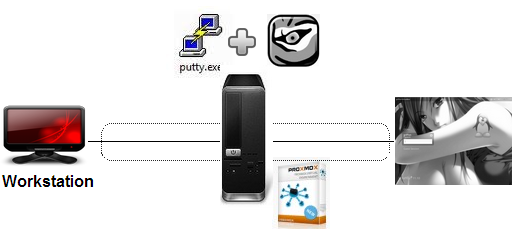
Proxmox VE 2.x – VNC over SSH Connections using a external VNC Client
Hello World, I’ve recently received a request about explaining how you could perform a VNC over SSH connection to a kvm virtual machine located on a Proxmox VE server. There is some information available onContinue reading

Proxmox VE 2.x – Install FreeNas as a KVM virtual machine
Hello World, Today, I’ll write about freenas solution and show you how to install it on your proxmox ve infrastructure. It has been a long time I’vn’t been working with Freenas and I have toContinue reading

Proxmox VE 2.1 – Adding Distributed Storage Technologies
Hello World, Introduction This would be a really short post ! On July 25 , 2012, the PROXMOX VE team has released a new kernel of their product. This release is mainly a maintenance release. However,Continue reading

Proxmox VE – TigerVNC Viewer in Ubuntu 12.04
Hello world, In this previous post, we have explained how to connect to a Proxmox VE virtual machine using an external vnc client. The post was assuming that you were using Windows as a platform (likeContinue reading

Proxmox VE – Connect to Virtual Machines through a VNC Client
Hello World, Recently, I’m encountering some small issues wit the web based VNC Viewer available within the Proxmox VE management interface. I can launch the vnc viewer and connect to the virtual machine. Howerver, the vncContinue reading