
Hello World, Since the last post (Windows 10 – Refreshing Desktop wallpaper without logoff/logon (PowerShell script – Ver. 2.0)) was related to some powershell script, we have decided to check and share some additional scriptsContinue reading
Category: Scripting
Scripting technology from bat to Powershell going through VBS

Scripting – Test-SmtpConnection Powershell Module Released – Version 1.0
Hello World, In our previous post (Powershell Script Alternative to Telnet SMTP Connection test”), we have quickly shared a small PowerShell Script that can be used to mimic the Telnet SMTP test against Exchange (orContinue reading

Scripting – Powershell Script Alternative to Telnet SMTP Connection test
The script hereafter is outdated and has been replaced by a newer version (i.e. PowerShell Module). Please Check the Download page for latest version. Hello World, This post will be quick quite shortContinue reading
Windows – How to bypass the NTFS long path limitations (max. 260 characters)
Hello World, This post addresses a quite known issue related to file path length limitation in NTFS filesystem. Every system administrator or file server administrator has encountered this issue while trying to delete folders orContinue reading
PowerShell Script – Active Directory Export and Import Tip
Hello World, As you have noticed, I’m not posting as regularly as I would lately. Sorry about that but I’m really busy with some difficult projects lately. So, I do not have much time forContinue reading
Automate IFM through Powershell Script
Hello World, As you can imagine, I’m quite busy lately. I do not have much time to post articles or blog about our favorite topics (i.e. IT). However, I managed to get some free timeContinue reading

Powershell Script – Wake on LAN utility Ver 1.0
Hello World, Today’s post will demonstrate how you can “quickly” create a GUI around your powershell script. Some time ago, I was working in an environment where free tools were not to be installed onContinue reading

Powershell Tip – Add computers to Group using ADD-ADGroupMember cmdlet
Hello World; Today; It will be also a short post ! Recently, I’ve been asked to help in writing a Powershell Script. The user was encountering a small issue in the script. One portion ofContinue reading

Powershell Script to update migration table
Hello World, I’m back with Powershell scripting and Migration table. If you remember, in some previous posts, we have demonstrated how to generate a migration table using powershell. In this post, we have seen howContinue reading
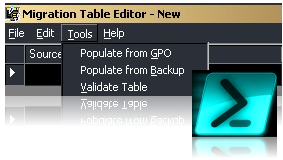
Using Powershell to generate Group Policies migration table (from GPO backup)
Hello world, In this post, I will provide a little extra information about the Powershell script used to generate Migration table. If you remember, we have discussed in this previous post how to generate migrationContinue reading